
Excel’s convenience can become an accounting weakness when important figures rely on manual entry, formulas and files that are hard to control. Understanding why spreadsheets are bad for accounting starts with this trade-off: they make quick calculations easy, but errors can go unnoticed and carry through to financial reports. For UAE small businesses, that can make reliable records and tax compliance harder to maintain.
It’s understandable that owners start with spreadsheets. They’re familiar, flexible and useful when transaction volumes are low or a one-off calculation is needed. The risk increases as more people update records, processes grow more complex, or the business needs a clear trail showing how figures were produced.
This article explains why small businesses rely on Excel, how formula, classification and duplicate-entry errors create audit and compliance risks, and where spreadsheet-based processes become difficult to manage. It also covers how automation and centralized accounting workflows can improve visibility and traceability, helping you decide whether spreadsheets still suit your business or a more controlled approach is needed.
Spreadsheet errors often start with omitted formulas, mistyped entries or duplicate transactions. When figures reach financial reports, limited visibility can make it difficult to trace their source.
A formula omission happens when a calculation is missing or leaves out new rows; a data-entry error happens when someone enters a figure or category incorrectly. For example, a copied formula might miss the latest transaction and understate an expense total without an obvious warning. Coding a purchase to the wrong account can also distort reports. Later calculations may then rely on inaccurate results, affecting connected records.
Manual accounting requires people to enter, copy and classify transactions, leaving room for everyday mistakes. A transposed digit, duplicate invoice or incorrect date can change totals or put revenue in the wrong reporting period. Errors can occur even when the original formula is correct, particularly when users edit cells or copy information between files. Checking entries against supporting records can reveal discrepancies, but the review takes time.
How often do spreadsheet errors occur in financial reporting? Research cited in the article estimates that up to 90% of spreadsheets contain at least one significant error affecting outcomes. That helps explain why spreadsheets are bad for accounting when errors pass through several reports unnoticed. Detection depends on review, reconciliation and clear visibility over changes.
How do spreadsheets compare with accounting software for cost and accuracy? Spreadsheets can be inexpensive to start using, but manual updates and checks add ongoing work. Accounting software can apply consistent calculations, though accuracy still depends on sound setup and reliable source data. Understanding why spreadsheets are bad for accounting also means recognizing that convenience does not replace controls over transactions and reporting.
The consequences can extend beyond correction work. JPMorgan Chase incurred a trading loss of 6 billion in 2012 following a spreadsheet formula blunder. In routine accounting, an incorrect calculation may flow into reconciliations or reports before discovery. Reviewers may also struggle to establish who changed a figure, when it changed or why. Documented adjustments and a clear review process help preserve the reasoning behind each change.
Automation moves repetitive accounting tasks from disconnected files into defined workflows. A centralized system keeps records together, allowing authorized team members to work from the same information instead of reconciling separate spreadsheet copies.
What accounting software controls reduce spreadsheet risks? Role-based access, change histories, approval steps and standardized calculations help manage who can edit records and how changes are reviewed. A useful audit trail shows who changed information, when it changed and why.
Standardized processes make routine work more consistent. For example, an automated expense workflow can apply the same categories and approval route each time, while centralized reconciliation keeps supporting data alongside the review. These controls make exceptions easier to find and investigate. They do not remove the need for oversight, but reduce reliance on manual copying and individual spreadsheet habits.
Finance software can automate recurring work, including recording expenses, preparing financial reports, and sending invoices or payment reminders. Cloud-based systems can also connect with a business bank, reducing repeated transaction entry. Where an ERP provides current values, automation should use those live values rather than hard-coded figures that may become outdated.
Centralization also supports visibility across a workflow. If one team member records a transaction and another reviews it, both can access the same record and its documented changes. Studies cited in the research indicate intelligent automation may lower data-entry errors by as much as 70%. The result depends on sound setup, reliable source data and review controls.
Automation is most useful when repeated processes have clear rules, such as invoice handling or expense recording. One-off modelling may still suit a spreadsheet, but critical accounting work benefits from consistent, reviewable workflows. Businesses that need support organizing these processes can consider bookkeeping and accounting services as a way to strengthen routine recordkeeping and reporting.
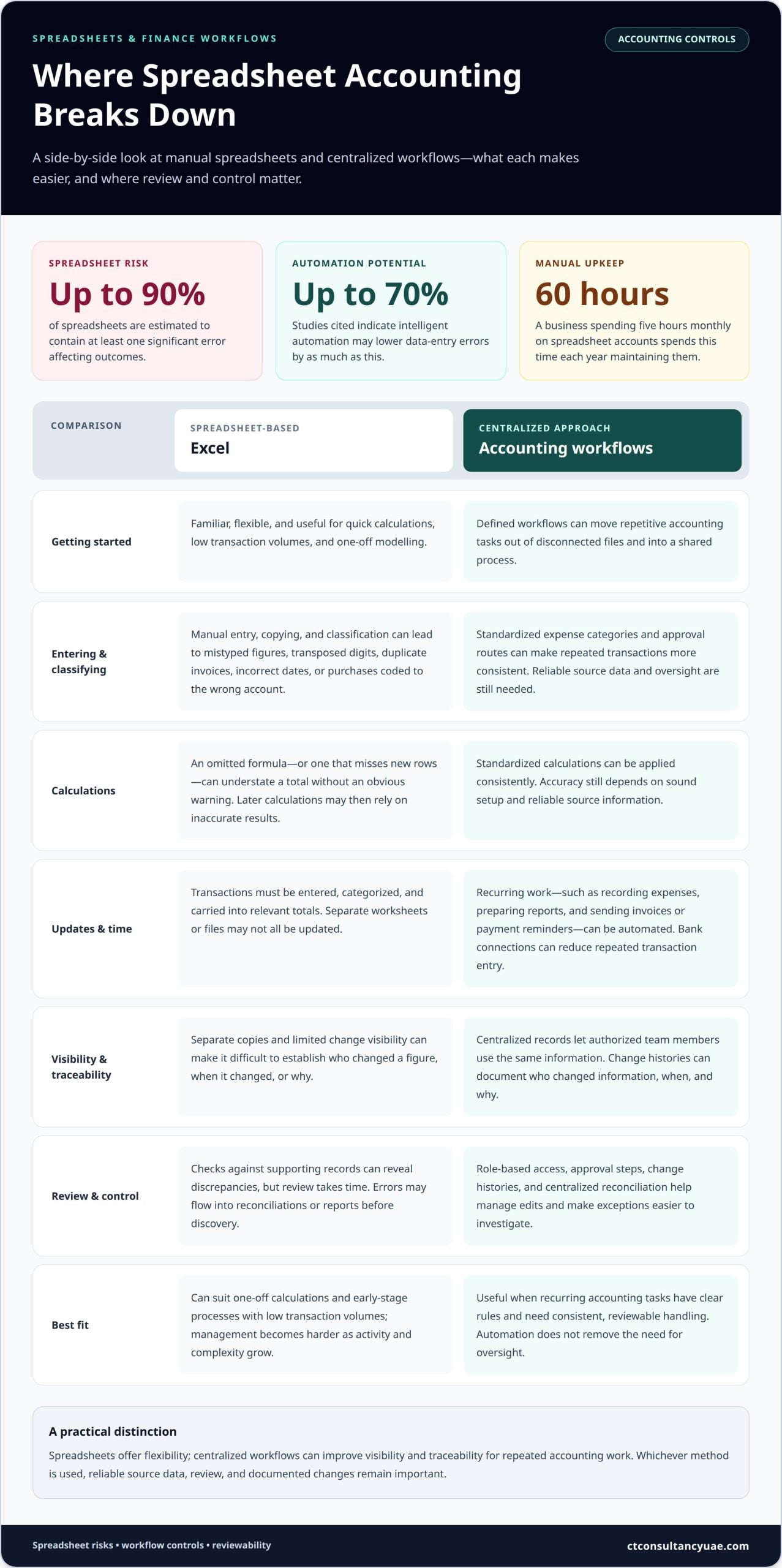
Excel is familiar, flexible and useful for recording money in and out, adding totals, and preparing graphs. For a small business, those functions can make a spreadsheet feel like a practical starting point before accounting processes become more involved.
Manual account maintenance means entering transactions, classifying them and updating totals by hand. A business owner spending five hours each month managing spreadsheet accounts spends 60 hours each year on that work. Those hours cover more than typing: records must also be organized and figures carried into summaries. As the number of transactions grows, routine administration can take time away from reviewing performance and planning business activity.
Spreadsheet records may need manual updates when information changes. A bank transaction, for example, may need to be added to the records, categorized and included in the relevant totals. If someone updates one worksheet but misses another, the figures can diverge. Repeating these steps each reporting period creates ongoing work and more chances for omissions.
Excel’s flexibility also explains its appeal: users can adapt a sheet for a quick calculation, one-off analysis or a basic report without changing their established process. A growing business, however, may move from 20 transactions each month to hundreds. At that point, manually recording and organizing every item can become harder to maintain consistently.
Invoice volume presents a similar pressure. A VAT-registered consultancy raising around 40 invoices each month must keep its sales record aligned with the related amounts and reporting summaries. Importing data can reduce rekeying where a compatible process exists, but spreadsheets still require users to maintain their records and explain how figures were assembled. The right approach depends on transaction volume, reporting needs and the time available for monthly updates.
Audit work can slow down when supporting records, calculations and approvals are spread across separate spreadsheet files. Documentation gaps can make it harder to explain how a reported figure was reached.
Audit rework happens when reviewers have to reconstruct a calculation or find the records supporting a reported figure. If a sales total differs between a summary sheet and transaction records, for example, the reviewer may need to trace entries, formulas and later edits to resolve the discrepancy.
That process can delay reporting and divert time from financial decisions. One survey found that 48% of executives reported either no usage controls or poor manual processes governing spreadsheet use. Clear review steps, documented adjustments and organized source records make it easier to explain a figure and identify where a discrepancy arose.
A spreadsheet is a recordkeeping format, but using one alone does not establish that accounting records meet UAE tax or audit requirements. Records need to support reported figures, and the business should be able to retrieve relevant information and explain how calculations were made.
For example, when an expense entry is not clearly linked to its supporting document, it becomes harder to substantiate the amount during a review. Disconnected worksheets can also obscure whether an adjustment was approved or whether a reported figure reflects current information. Consistent records and traceable changes help reduce this risk.
When relying on spreadsheets, businesses can reduce avoidable rework by keeping supporting documents linked to entries, documenting adjustments and restricting edit access. These practices improve visibility, but they still require disciplined maintenance as transactions and reporting needs change. A structured review can help identify recordkeeping gaps; explore UAE tax compliance support when your records need closer alignment with reporting obligations.
CTC Tax & Accounting helps UAE businesses improve financial records when spreadsheet updates become difficult to manage or figures need clearer review. Its bookkeeping and accounting services help organize routine records, while internal audit services assess controls and identify documentation gaps. VAT compliance and corporate tax advisory support businesses with related reporting responsibilities, in accordance with UAE regulations.
The right next step depends on the issue. Recurring recordkeeping challenges may call for accounting support, while concerns about controls or review readiness may warrant an internal audit. For tax reporting questions, VAT compliance or corporate tax advisory may be relevant, in accordance with UAE regulations. This offers a practical way to move from identifying spreadsheet risks to improving the underlying accounting process.
Contact CTC Tax & Accounting to discuss your accounting records and support needs.
Understanding why spreadsheets are bad for accounting is less about abandoning a familiar tool and more about deciding which records need stronger controls. Spreadsheets may still be useful for analysis, while core transaction records and reporting workflows benefit from consistent review and documented changes. Start by identifying where manual handling causes problems, then decide which process would benefit most from a more structured approach.
For a UAE business, the decision should reflect how bookkeeping, internal controls and tax reporting fit together. CTC Tax & Accounting provides accounting support, internal audits and VAT compliance in accordance with UAE regulations, with an approach shaped around your business rather than a generic template. A focused review can clarify priorities and help set a practical direction for improving recordkeeping.
Contact CTC Tax & Accounting to discuss the accounting support that fits your next stage of growth. Clearer processes can make confident decisions easier.
Yes. Automation can reduce audit friction by applying consistent processing rules and recording transaction activity. For example, a workflow can flag an invoice amount that differs from its purchase order, so it can be reviewed before the period-end report is prepared. Automated records can also help trace how data moved through a process. Effective controls still rely on accurate source information and appropriate review procedures.
Spreadsheets can contribute to inaccurate or late UK tax filings, which may lead to penalties under UK rules. HMRC applies to UK tax matters, so its penalties are not UAE tax penalties. A UAE business should assess its UAE reporting obligations separately and keep supporting records for reported figures. Any UK filing obligations should be considered independently.
No. Excel can work for simple records, one-off calculations and management analysis, especially when a business has few transactions and a clear review process. It becomes less suitable when multiple people maintain separate files or reporting needs to be repeatable. For instance, tracking customer balances in a worksheet may be manageable at first, but matching receipts to invoices requires reliable, current records and regular reconciliation.
Records, supporting documents and routine bookkeeping can be organized through a shared process instead of separate files. For example, a business can maintain one customer record and use it when preparing invoices and reviewing balances. This makes information easier to find and reduces duplicate recordkeeping. Clear access permissions also define who can enter, review or approve specific accounting information.
CPA firms should reassess their reliance on spreadsheets when client work requires repeated handoffs, consistent review evidence or dependable separation of client records. If staff copy data between files for monthly close, for example, it may be difficult to establish which version supports a conclusion. Spreadsheets can still serve analysis, but core client records need controls for review, access management and traceable adjustments.
Consider changing your process when maintaining files takes attention away from reviewing results, or updates regularly depend on one person’s knowledge. One practical warning sign is being unable to produce the same report consistently from the same source records. Before changing systems, identify essential workflows, such as invoicing, expense coding and reconciliations, then assess whether a centralized process can manage them with clearer ownership and review.